
Safety and Prevention | Occupational Safety and Health Audits
Health and Safety Audits: Monitor Standards and Identify Areas for Improvement
Conduct audits conveniently on your phone, document non-conformities, and analyze results all in one place. The WinWin App’s Occupational Safety and Health Audit module streamlines periodic safety inspections—from workplace checklists to reports for occupational safety and health teams and management.
You know what has been checked, what problems have been identified, and where it's worth focusing your corrective actions.

Compile the audit results into a single overview of the situation
Checklists in binders, photos on phones, and summaries on separate sheets make it difficult to identify recurring issues. Gathering information from several departments requires additional work before conclusions can be drawn.
WinWin integrates the audit process, documentation, and reporting. This makes it easier to move from a single observation to setting priorities for the entire organization.
Paper forms and separate files
- Notes from the audit need to be transcribed later.
- You need to find the photos and match them to the problem description.
- It is difficult to determine which audits have been initiated and which are overdue.
- Comparing departments requires compiling several reports.
- Recurring problems must be identified in subsequent logs.
Audits in the WinWin App
- You enter your responses directly into your phone during the audit.
- The explanations and photos are associated with a specific question.
- The list shows the dates, statuses, and progress of the audits.
- The report presents data for the selected period and entities.
- The list of irregularities shows how often they occur.
The auditor knows what to check and what to do next
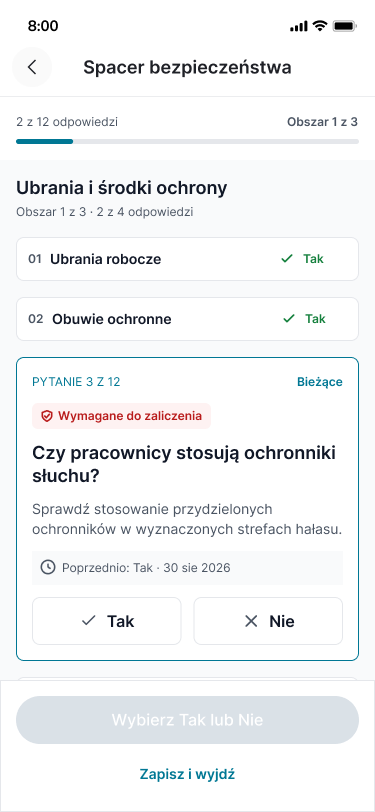
Whether on the production floor, in the warehouse, or during a safety walk, a straightforward inspection process is key. The mobile checklist guides you through the various areas and questions, and the tips help you assess the situation on site.
Audits and Deadlines at Your Fingertips
View upcoming, in-progress, and overdue audits. For each audit, you can check its due date, and for in-progress audits, you can also check their progress.
Questions organized by topic
Work through the topics one by one, covering, among other things, safety measures, the workstation, and organization and communication. The question description will guide you on what to focus on.
Background of the Previous Audit
Reviewing the findings from a previous, comparable audit helps identify changes and reexamine conditions that were previously reviewed.
The possibility of returning to work
Save the audit you've started and continue it later. Before finishing, review the summary and correct your answers if necessary.
Free E-book
Workplace safety is an investment that pays off!
Discover a business perspective on workplace safety. Download the WinWin ebook and learn why it’s important to promote prevention and build a culture of safety within your organization.

Show me what the problem is
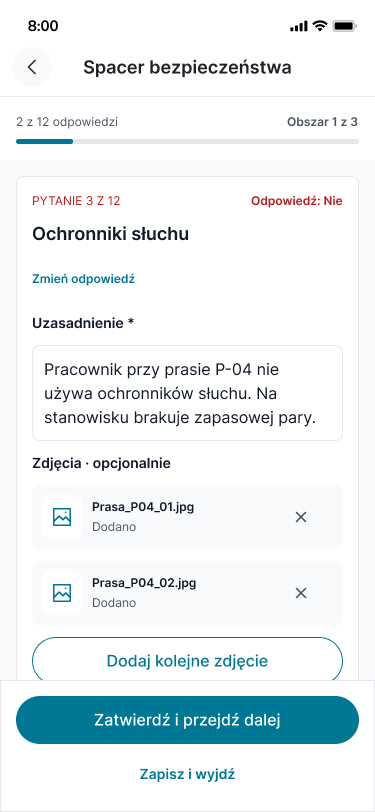
Just knowing that there's a discrepancy isn't enough to fully understand the situation. WinWin lets you note what needs to be corrected and where the problem lies, and supplement the description with photos.
The documentation remains with the question to which it relates—along with the auditor's response.
Specific justification
If the response indicates a nonconformity, the auditor provides a description of the situation. The person reviewing the result receives the context needed to take further action.
Photos from the inspection site
Take a photo or select one from your phone's gallery. Show the condition of the workstation, any missing equipment, or incorrect labeling.
The story will be available after completion
In the archive, you can review your saved responses, justifications, and attachments. You can focus solely on the discrepancies to review the detected issues more quickly.
A clear result. Pay special attention to critical conditions.
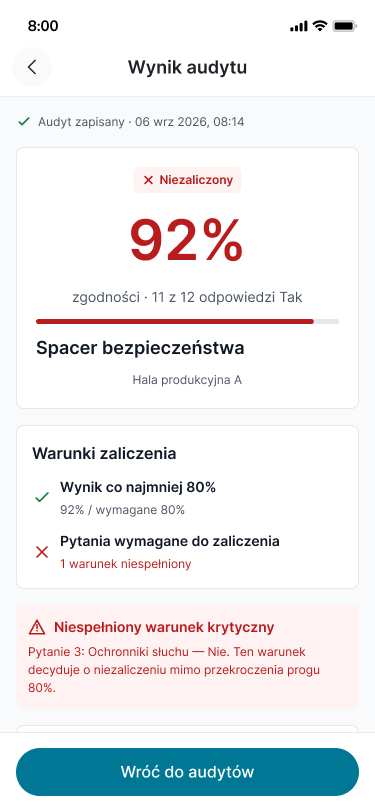
Before the audit begins, you'll know the criteria for passing it. Once it's over, you'll receive a percentage score, a status, and an explanation if the requirements weren't met.
The evaluation takes into account both the required threshold and the questions marked as critical. Failure to meet a critical requirement results in a failing grade for the audit, even if the percentage score exceeds the threshold.
As a result, the most important safety requirements remain of decisive importance in the assessment of controls.
See which issues keep recurring and where they occur
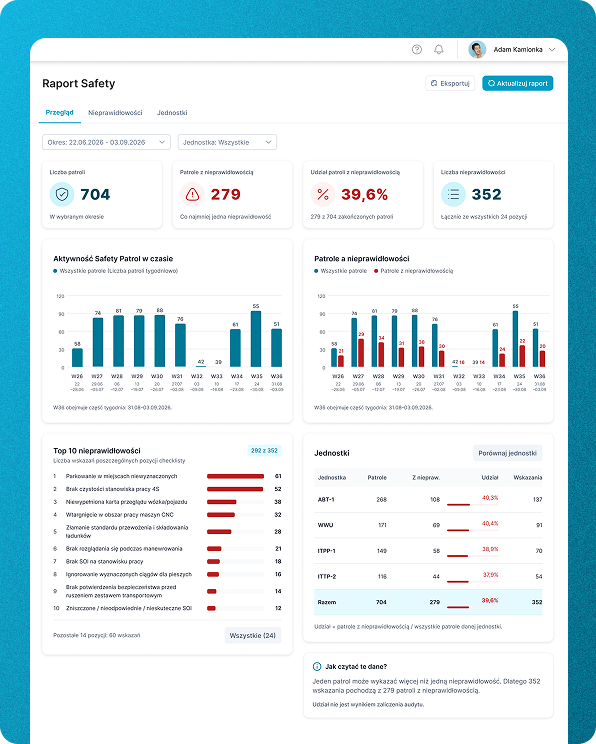
The web-based dashboard compiles audit results into clear reports. Occupational safety and health departments and management can review the scope of audit activities, the frequency of non-compliance, and differences between units.
This data helps identify areas for further analysis and plan next steps.
Overview of the Situation
The number of inspections conducted, audits with irregularities, and all detected irregularities—the most important information in a single view.
Activity Over Time
See how the number of inspections is changing and how many of them reveal problems. Identify periods of increased activity and lulls that require explanation.
The Most Common Irregularities
The ranking and complete list of findings show which issues recur most frequently. This makes it easier for you to determine which topics should be included in training sessions, communications, and future audits.
Comparison of Units
Compare departments or locations within the same time period. Evaluate the number of nonconformities alongside the number of audits conducted to maintain the context of the comparison.
Selected Range and Export
Filter the report to the desired time period and unit. Export the report for further work or to discuss with your team.
Useful information at every level of the organization
For audit personnel
A well-organized checklist, clear questions, and the ability to document observations on your phone. Less time spent organizing notes after returning from the facility.
For occupational safety and health departments
Results, explanations, and photos all in one place. This makes it easier to identify recurring issues and develop strategies for preventive measures.
For Managers
A clear picture of the issues identified within the unit. Data that helps facilitate discussions with the team about work standards and determine what to address first.
To the Board of Directors
A summary of audit activities and identified issues within the organization. A basis for discussions about priorities, training, and investments in security.
Start by getting a better picture of security in your company
Schedule a demo of the Occupational Safety and Health Audits module. We’ll show you how to conduct an audit on your phone, document non-conformities, and generate reports for management.
Let's talk about how to streamline audits in your organization and use the results in day-to-day management.