
Communication and Motivation | Bonus Calculator
Bonus Calculator: Clear Results for Employees, Efficient Processing for the Company
Combine employee evaluations, bonus calculations, and approval of results in one place. The manager organizes the team’s evaluations, the administrator checks their status, and the employee can view their points and bonus amount in the app.
Less manual data entry. More transparency with every settlement.

Track bonuses without the chaos of spreadsheets
When processing bonuses, you need to collect evaluations, review results, account for adjustments, and ensure approvals are obtained. When information is scattered, it’s difficult to determine what’s already complete and what still requires action.
When bonuses are based on multiple worksheets
- Evaluations and reports are circulating among supervisors.
- The reasons for the corrections are provided in separate messages.
- You need to check the settlement status with each person in turn.
- Explaining the results to an employee requires gathering the information again.
With the WinWin Bonus Calculator
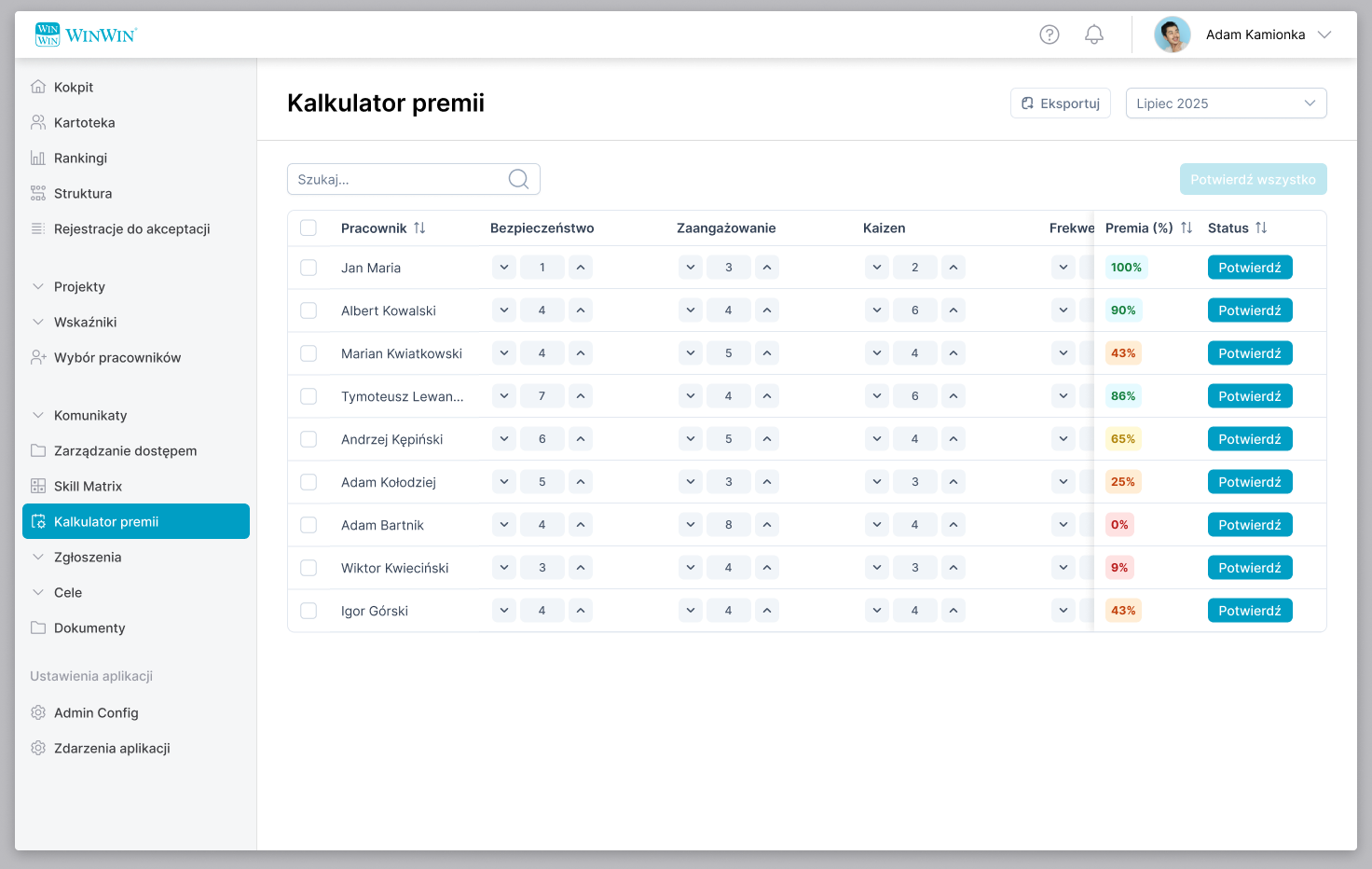
- The team's ratings and results are listed in a single table.
- You can add a justification for the changed value.
- The status shows which results are awaiting confirmation.
- Employees can view their points and the percentage of their bonus.
Show what goes into the bonus calculation
The discussion about the bonus becomes more concrete when the final result can be linked to specific evaluation areas. The calculator organizes the points into categories that the supervisor can review before approving the settlement.
Safety
The safety area assessment appears as a separate item in the list.
Commitment
Points for engagement are presented alongside the other evaluation criteria.
Kaizen
A separate category that takes into account an employee's contribution to improvements.
Attendance
A separate category for attendance in the bonus evaluation.
A clear breakdown helps identify which areas are driving the results and what topics are worth discussing with the employee.
The entire team in a single view
Select a month, search for an employee, and view their performance ratings without having to switch between separate documents. The summary combines performance rating categories, bonus amounts, and approval status.
For the supervisor
A convenient overview of the team's results, with the ability to adjust ratings and confirm settlements.
For the administrator
Broader context: employee IDs, job titles, information about supervisors, and approval statuses.
It's easier to keep track of the progress of the settlements and identify items that still require attention.
Points, percentages, and bonus amounts—all in one place
The assessment itself does not complete the calculation. The calculator combines the results in each category with the bonus percentage and the amount expressed in PLN.
The employee's salary is also available in the payroll view. The person preparing the report can view the financial data alongside the evaluations without having to look for it in other tables.
Ratings by category
A basis for discussing the result.
Bonus as a Percentage
A clear summary of the bonus evaluation.
Bonus in PLN
A specific amount on the statement.
Change in Grade with a Clear Explanation
If a rating needs to be adjusted, a supervisor can change its value and add a comment explaining the decision.
The justification remains attached to the assessment to which it pertains. This ensures that the person reviewing the result has access to the context of the change, rather than having to piece it together from messages or verbal discussions.
- Correct the value in the appropriate category.
- Add a comment explaining the change.
- Check the result before confirming it.
This provides a solid basis for explaining why the assessment was changed.
You know right away which bonuses have been approved
Evaluating an employee and confirming their results are two separate steps. Clear statuses help you identify which reimbursements have been approved and which are still pending confirmation.
Single Confirmation
Check a specific employee's results and approve them after verification.
Bulk Confirmation
Use the bulk action once the results have been reviewed and are ready for approval.
Progress Preview
The administrator can see both approved and pending items in the list.
Less manual status setting. A clearer workflow for month-end closing.
Check and approve the bonus on your phone as well
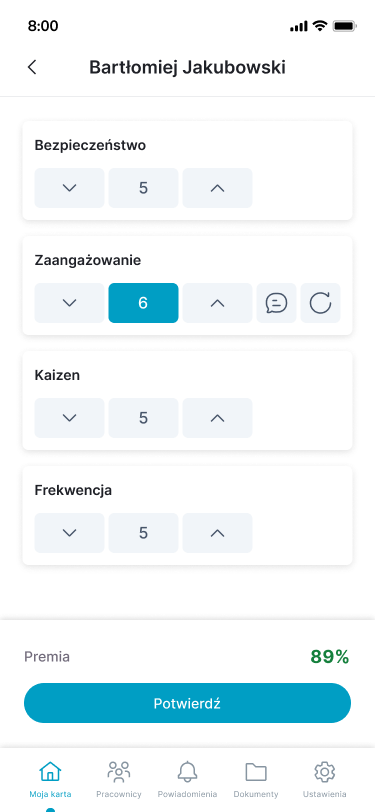
A supervisor can navigate from an employee's profile to their Bonus Calculator and perform the most important tasks in the mobile app.
On the phone's screen, they will check the ratings in each category, adjust the score, add a justification, and confirm the result.
A percentage summary is displayed during the approval process, and once approved, the status “Approved” appears.
Convenient access for leaders who spend part of their day working away from their desks.
Employees can see their scores and points in each category
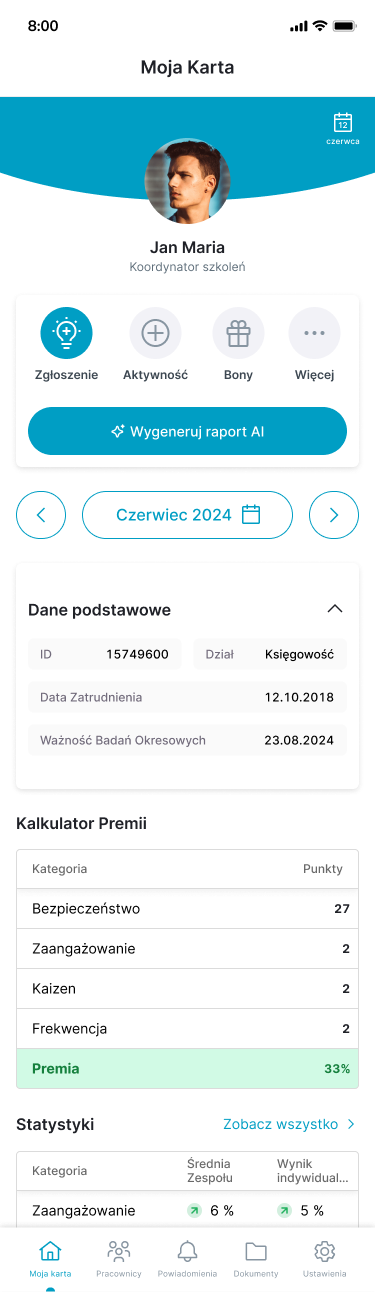
In “My Card,” employees can view a summary of their bonuses: points for safety, engagement, Kaizen, and attendance, as well as their final percentage score.
You can check your performance review in the app on your own and prepare for a conversation with your supervisor.
Clear categorization
The employee sees the individual evaluation components side by side.
Bonus Results at Your Fingertips
The summary is available on his phone, right where he uses it every day.
A More Specific Conversation
The employee and supervisor can address the items in a given area while discussing the results and expectations for the next period.
Organize the settlement by selecting the month for export
1. Select the billing period
Select the month for which the evaluations and bonus results apply.
2. Check the team's ratings
Review the values in each category. Make any necessary adjustments and provide justifications for them.
3. Confirm the results
Approve verified settlements individually or in bulk. Check which items are still pending confirmation.
4. Export the report
Download the data for the selected period to continue working on the settlements.
A single, well-organized workflow helps the team prepare a complete bonus statement.
Get your bonus calculations in order. Make it easier to discuss results.
Give managers a convenient tool for evaluating and approving performance, give administrators insight into the progress of performance reviews, and give employees access to their own results.
Watch the presentation to see how the WinWin Bonus Calculator can support the bonus process in your organization.